
By Saket Narnolia, Founder
AI Receptionist Guide for Auto Repair Shops
A practical guide for auto repair shops to convert inbound calls into scheduled repair appointments using an AI receptionist.
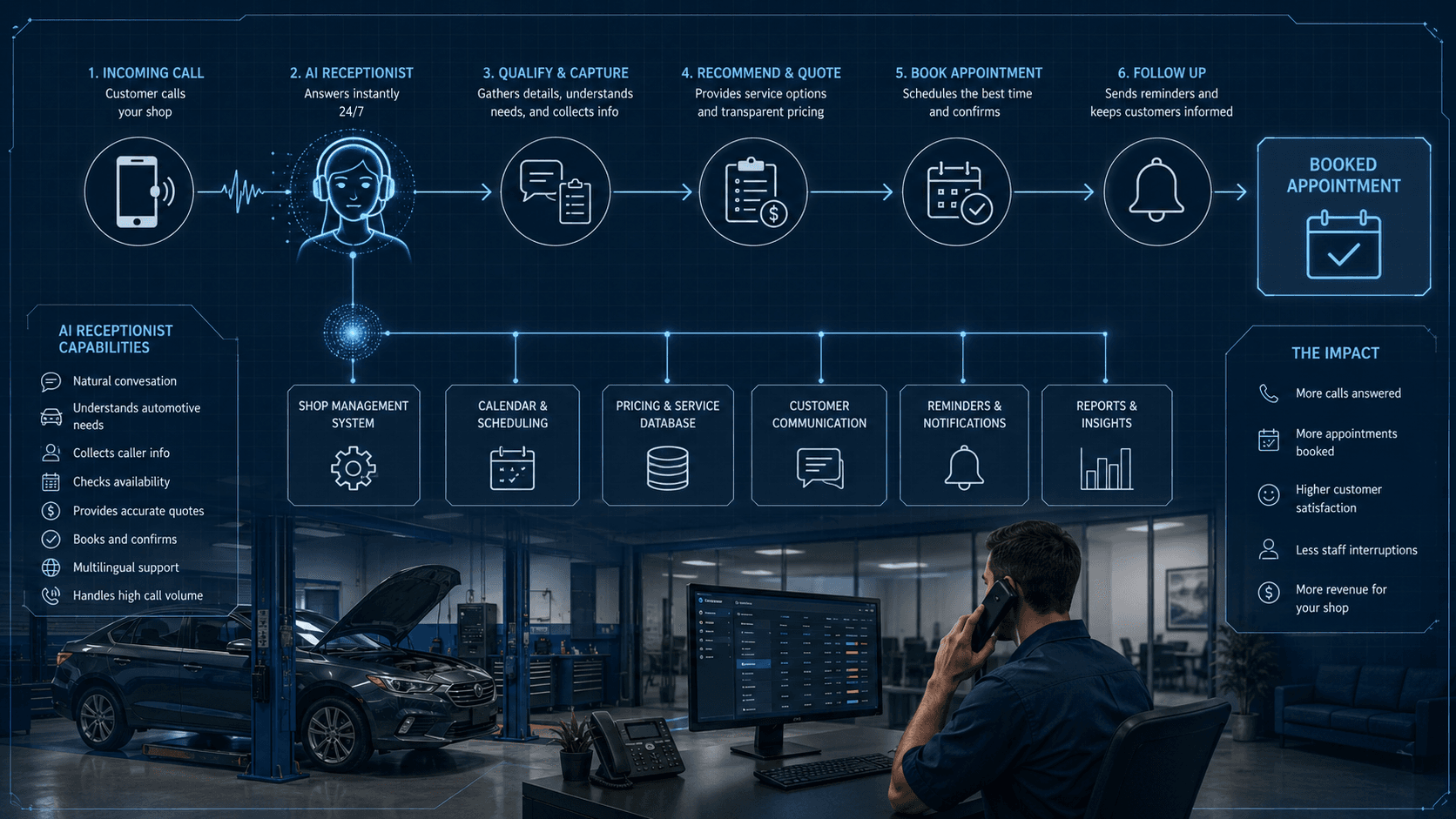
Auto repair shops lose a significant portion of potential revenue not because of marketing or competition, but because callers don’t reach a human who can book their appointment. An AI receptionist fixes this by answering every call, handling common repair questions, providing pricing ranges, and scheduling appointments directly into your system. This guide shows auto repair shop owners precisely how to implement an AI receptionist—step‑by‑step—and how MyJarvis can slot into your existing workflow without disruption.
Why Auto Repair Shops Lose Appointments on the Phone
The reality of missed calls and long hold times
When phone volume spikes—mornings, lunch breaks, Mondays—many shops can’t keep up. Callers might get voicemail, long rings, or a stressed service advisor juggling walk‑ins and diagnostics. Every missed call is a missed booking opportunity.
Even when the phone is answered, slow greeting times or rushed responses can send callers to the next shop in their search results.
How inconsistent phone handling kills conversion
Your best service advisor may convert almost every call, but that consistency rarely extends across the day. Calls get answered differently depending on who picks up, their workload, and whether they know current shop availability.
Examples of where inconsistency hurts:
- Price range delivered confidently vs. “I’m not sure, let me check.”
- Clear appointment offer vs. “You can come whenever.”
- Missed follow-up on a quote.
When customers call competitors instead
Auto repair customers are impatient for a reason—they’re stuck. If they’re calling about brakes, AC, or a check engine light, they want fast clarity. When they don’t get it, they simply call the next shop. That’s preventable.
An AI receptionist ensures every call gets a clear, immediate path to a booked appointment, whether at 8am, 5:30pm, or during a service rush.
What an AI Receptionist Can Do for a Repair Shop
Core capabilities
A well‑implemented AI receptionist—like a MyJarvis AI Voice Employee—can:
- Answer every inbound call within two rings.
- Greet customers professionally and consistently.
- Identify repair needs using natural conversation.
- Provide pricing ranges (example: standard brake pad replacement range).
- Offer next available appointment slots.
- Book directly into your scheduling system.
- Send confirmation and reminders.
- Trigger CRM follow‑ups for missed calls and quotes.
Limits and escalation rules
AI is not a diagnostician. It can:
- Give general pricing ranges.
- Ask clarifying questions.
- Determine urgency.
- Route calls to a human when needed.
AI should escalate when:
- The caller requests a specific technician.
- A repair requires detailed diagnostic explanation.
- Tow-in or emergency situations require human coordination.
How MyJarvis fits into your shop’s workflow
MyJarvis integrates with your existing booking tools, CRM, and missed‑call recovery. For shops using digital schedulers or management systems, MyJarvis simply reads your availability rules and books accordingly.
Relevant internal resources:
- Learn more about MyJarvis AI Voice Employee: AI Voice Employee
- Estimate your revenue loss from missed calls: Missed Call Calculator
Step‑by‑Step: Build Your AI Appointment‑Booking System
Step 1: Map your current call types
List your top 10 call types. Most shops see variations of:
- General diagnostic
- Brake noise or vibration
- AC not cooling
- Check engine light
- Oil change or maintenance
- Tires or alignment
- Tow‑in or urgent repair
For each category, define:
- What information you need from the caller
- What appointment type they should be booked into
- When escalation is required
Step 2: Define booking rules and availability
Your AI receptionist needs clear rules, such as:
- Same‑day capacity limit (example: 3 diagnostics per day)
- Drop‑off vs. wait appointments
- Technician‑specific services (if any)
Avoid vague logic like “We can usually fit people in” because it leads the AI to over‑offer or under‑offer availability.
Step 3: Set pricing ranges and service explanations
Provide pricing ranges the AI can reference. These should be realistic but not overly detailed.
Examples (clearly labeled as examples only):
- Brake pad replacement range: Example: $X–$Y depending on vehicle.
- AC recharge starting range: Example: $X and up.
Also specify your preferred language for common explanations, such as:
- “We perform a full inspection first so we can give an accurate estimate.”
- “Most diagnostics take about an hour.”
Step 4: Connect scheduling and CRM tools
MyJarvis reads from your schedule in real time and writes new bookings into it. This ensures:
- No double booking
- Accurate drop‑off windows
- Automated confirmations and reminders
If your shop uses follow‑ups, MyJarvis can automatically trigger:
- Missed-call recovery workflows
- Quote follow-up reminders
- “Ready for pickup” alerts
Step 5: Turn on missed‑call recovery
Most shops underestimate how many calls they lose. Missed‑call recovery solves this by:
- Calling back missed callers automatically within minutes
- Asking if they’d like to book an appointment
- Resolving basic questions
Tie this system into your CRM or booking tool for full tracking.
Step 6: Test with real customer scenarios
Test the AI with:
- Difficult pricing questions
- Multi‑service requests
- Urgent situations
- Non‑repair calls (e.g., hours, location)
The goal: ensure the AI routes calls correctly and offers appointments confidently.
Call‑Flow Examples for Common Repair Scenarios
Below are text‑based “diagram” examples showing how MyJarvis AI handles real scenarios.
General diagnostic call
Caller: “My car is making a rattling sound.”
AI Flow:
- Greet → Ask for symptoms → Identify as diagnostic → Explain inspection process → Offer first available slot → Book.
Brake job price inquiry
Caller: “How much for brakes on a Honda?”
AI Flow:
- Ask front/rear clarification → Provide example price range → Explain inspection requirement → Offer appointment → Book.
AC not blowing cold
Caller: “AC isn’t cold anymore.”
AI Flow:
- Ask cooling level, smell, noise → Clarify issue → Provide general AC service overview → Offer next appointment → Book.
Check engine light call
Caller: “Check engine light came on.”
AI Flow:
- Ask if flashing or steady → If flashing, escalate → If steady, offer diagnostic appointment → Book.
Tow‑in or same‑day urgent repair
Caller: “I need to tow my car; it won’t start.”
AI Flow:
- Confirm location → Collect details → Escalate immediately to shop staff.
Checklist: What to Prepare Before Launching Your AI Receptionist
- Clear appointment types
- Price ranges for common services
- Same‑day capacity rules
- Escalation triggers
- Current holiday hours
- Voicemail routing preferences
- CRM integration access
- Scheduling login or API access
Common Pitfalls and How to Avoid Them
Overly broad scripts
If you provide vague instructions, the AI won’t handle edge cases well. Provide specific booking logic.
Missing same‑day availability logic
Shops forget to define drop‑off policies for urgent repairs. Build explicit rules.
No escalation paths
If everything is handled by AI, callers needing human help get stuck. Define clear triggers.
How to Measure Success in the First 30 Days
KPIs to monitor
- Appointment conversion rate from inbound calls
- Missed-call recovery conversions
- Average time to answer
- Escalation rate (should trend down as tuning improves)
How to adjust scripts
Use real recordings to update:
- Pricing ranges
- Service explanations
- Escalation rules
- Appointment capacity limits
FAQ: AI Receptionist for Auto Repair Shops
Can an AI receptionist handle repair‑specific questions? Yes—within the boundaries you define. It can give price ranges, explain diagnostics, and ask clarifying questions. It will escalate when specific technician insight is required.
How does the AI know when to escalate to a human? You set rules. Tow‑ins, flashing check engine lights, repeat callers asking for a technician, or complex diagnostics trigger immediate escalation.
Can the AI receptionist integrate with my current shop management software? MyJarvis integrates with most digital scheduling and CRM tools. Setup involves connecting your calendar and defining appointment types.
Will customers notice they're speaking to AI? Most callers perceive it as a professional receptionist. Voice tuning lets you match your shop’s tone.
How fast can we launch? Most shops go live in a few days after drafting scripts and connecting scheduling.
More answers can be found on the main FAQ.
Next Steps
If you want a reliable way to convert more calls into booked appointments—and reduce the load on your advisors—MyJarvis can help. Get personalized recommendations for your shop during a free strategy call.
Want this answering leads while your team is busy?
We can map your missed-call, booking, and follow-up workflow into a practical AI voice employee plan.
Get the automation checklist
A simple checklist for spotting the first workflow worth automating.