
By Saket Narnolia, Founder
CRM Follow-Up Automation Guide for Service Teams
A practical guide for service teams to cut missed calls using CRM follow‑up automation—without hiring more staff.
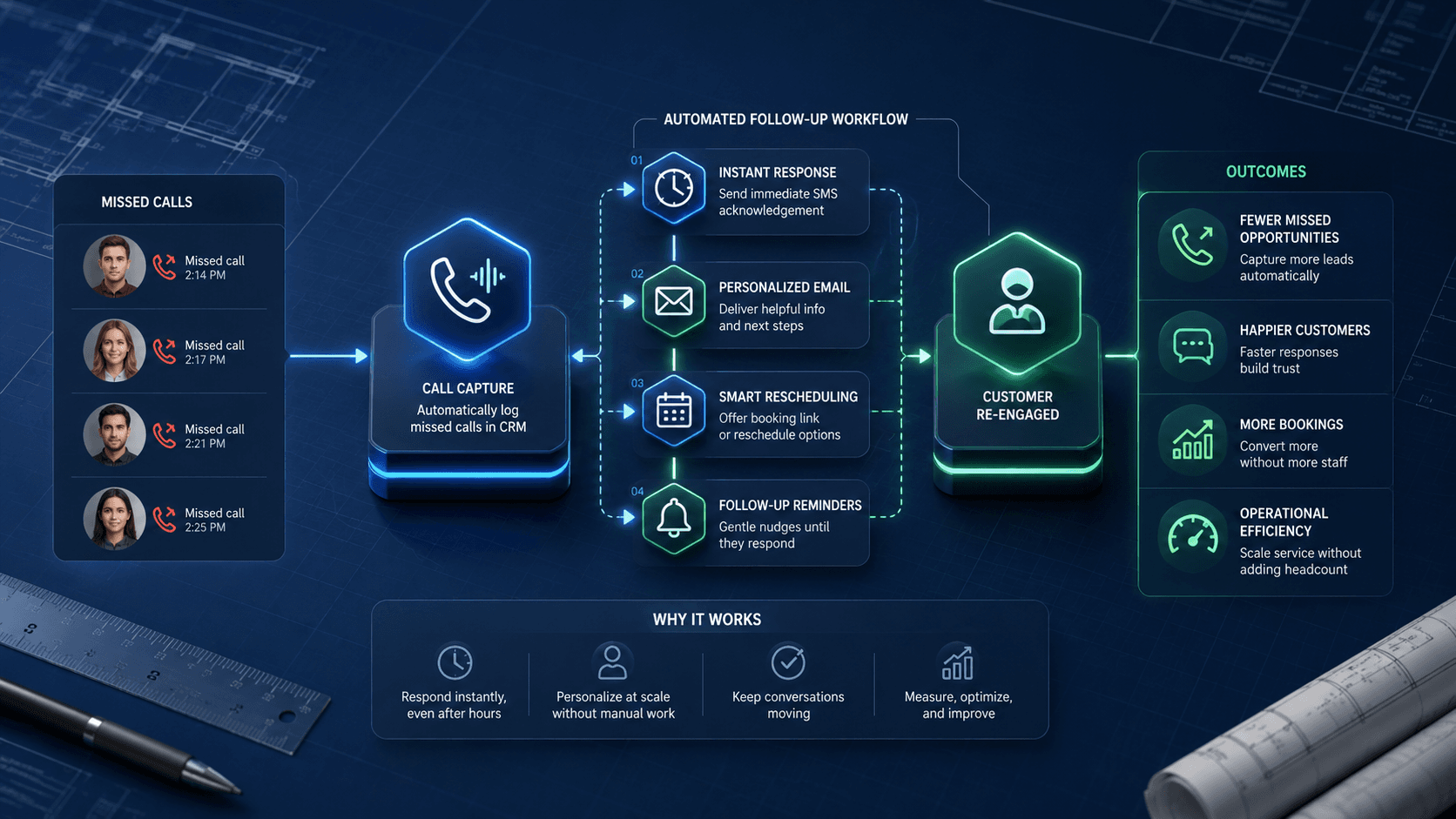
Busy service teams rarely miss calls because they don’t care—it's because dispatch is juggling jobs, techs need approvals, and office staff are already at capacity. CRM follow‑up automation gives you a way to recover those missed calls instantly, without adding another person to payroll. This guide shows exactly how to set up a reliable missed‑call workflow, how to avoid the usual automation mistakes, and when adding a MyJarvis AI voice employee gives your system true 24/7 coverage.
Why Missed Calls Are Expensive for Busy Service Teams
The hidden operations cost of a missed call
When a service customer calls, the timing usually means urgency: they want a repair, estimate, inspection, or scheduling confirmation. If that call goes unanswered, the cost isn’t just the potential job—it’s the disruption to your pipeline.
A missed call can lead to:
- Lost job opportunities when the customer moves on to the next provider.
- Gaps in your dispatch schedule that reduce tech utilization.
- More follow‑up calls later, creating backlog.
- Lower customer confidence in your responsiveness.
How a missed call breaks the job pipeline
The typical service pipeline is: inbound call → qualification → scheduling → dispatch → job completion. A single missed call stops this process at the first step, creating a leak that compounds throughout the day.
For example (illustrative only): if even a handful of inbound calls go unanswered during peak hours, the team may end up with under‑utilized technicians, unfilled routes, and slower cashflow. It’s not a traffic problem—it’s a conversion problem.
How to calculate your missed‑call loss
You can estimate the opportunity cost using the MyJarvis missed‑call calculator. Even small call‑volume businesses are shocked by how much revenue slips away when no automated recovery is in place.
How CRM Follow‑Up Automation Reduces Missed Calls Without More Staff
What automation actually handles
CRM follow‑up automation doesn’t answer the phone for you—it handles the recovery workflow triggered when a call goes unanswered. The CRM can instantly initiate:
- A call‑back text asking how you can help.
- A voicemail‑drop or email follow‑up.
- A scheduling link or request for details.
- A task or routing assignment for the right team member.
This turns every missed call into a captured conversation instead of a lost opportunity.
Where human staff still matter
Automation won’t replace your dispatcher or office team. Instead, it reduces their workload by:
- Filtering out non‑urgent calls.
- Pre‑qualifying service inquiries.
- Letting staff handle only the calls that actually need a human.
Your team becomes more available for valuable conversations instead of playing phone tag.
Role of MyJarvis AI voice employees
When CRM automation handles the initial recovery but the customer wants to talk right now, a MyJarvis AI voice employee can answer the overflow call, collect details, and even book the job. This bridges the gap between automation and live support.
Learn more about how these systems fit together on the MyJarvis AI voice employee page.
Implementation Playbook: Build Your Missed‑Call Automation Workflow
This section walks you through the full build—from mapping call paths to testing in real scenarios.
Step 1: Map your inbound call paths
List all call types your business receives:
- Service requests
- Estimates/quotes
- Job updates
- Billing questions
- After‑hours calls
Then map where each call type should go. Example: service requests → dispatcher; billing → office admin.
This ensures your automation routes calls properly instead of flooding the wrong person.
Step 2: Set the missed‑call trigger inside your CRM
Most CRMs allow you to trigger a workflow based on a call status. You want the automation to activate when:
- A call is missed
- The call is unanswered after X rings
- The caller hangs up before staff answer
Be sure to specify only inbound calls. Outbound calls should not trigger your missed‑call workflow.
Step 3: Write the first‑touch recovery message
Your first message must feel personal and helpful—not robotic. Keep it short:
"Sorry we missed your call. How can we help you today? Reply here and we’ll get you booked in."
Avoid long paragraphs or upsell language. The entire point is to re‑engage quickly.
Step 4: Build the sequencing logic (timing, channels, retries)
A simple but effective sequence looks like this:
- 0 minutes: Text message sent.
- 3–5 minutes: Voicemail drop or email.
- 30 minutes: Second attempt if no response.
- Next business day: Final follow‑up.
Inside the CRM, ensure each step only fires if the previous one didn’t receive a reply. Otherwise you risk overwhelming the caller.
Step 5: Connect routing to dispatch or booking
When a caller replies, you need the CRM to:
- Create a task for the right team member.
- Assign a status (“Recovered Missed Call”).
- Trigger the scheduling workflow.
This closes the automation loop by moving the customer back into your service pipeline.
Step 6: Add optional AI voice callbacks via MyJarvis
If a caller replies with “call me,” the CRM can trigger a MyJarvis AI voice employee to:
- Call the customer
- Collect details
- Offer available booking slots
- Confirm appointments
This gives your team instant responsiveness—even when no humans are available.
Step 7: Test with real scenarios
Before going live, test your workflow using real phone numbers and real devices. Walk through scenarios like:
- Caller hangs up quickly
- Caller texts back
- Caller ignores the text
- Call happens after hours
Testing ensures your messages fire correctly, the routing is accurate, and staff notifications are working.
Checklist: What Must Be in Place Before You Launch
Use this checklist to ensure you’re ready:
- CRM fields for caller ID, call status, call time, and conversation logs
- Routing rules based on call type
- Approved message templates for text and email
- Team notifications set up for recovered calls
- Dispatch workflow connected to the automation
- After‑hours rules defined
- Opt‑out compliance and language added
If any of these are missing, automation will break or trigger inconsistently.
Common Pitfalls and How to Avoid Them
Over‑automation that feels robotic
Avoid long messages, all‑caps, or over‑eager sales language. Keep the tone simple and human.
Delayed triggers
If your CRM waits 5+ minutes before sending the first message, you lose the advantage. Ensure your first step fires instantly.
No tracking for recovered calls
Add a CRM field or tag—“Recovered Missed Call”—so you can measure the actual impact of your automation.
If you track nothing, you can’t optimize.
When to Add an AI Voice Employee from MyJarvis
Automation is powerful, but it’s not always enough. You should consider adding a MyJarvis AI voice employee when:
You have after‑hours coverage gaps
If callers often contact you outside business hours, automation alone won’t satisfy urgent customers. AI voice support closes the gap.
Your team faces overflow volume
During peak seasons, the phone may ring faster than your staff can answer. AI voice employees catch the overflow and prevent missed calls.
You want direct booking without staff involvement
MyJarvis can offer booking times, confirm appointments, and pass details directly into your CRM.
To explore options, you can book a strategy call through the MyJarvis consultation page.
FAQ
Will CRM automation actually reduce missed calls if my team is overwhelmed?
Yes—because automation recaptures the caller immediately. Instead of waiting for staff to return the call, the CRM initiates the conversation and routes it to the next available step. This spreads workload without hiring more people.
How long does it take to set up a missed‑call automation workflow?
Most teams can complete the setup in a few hours if the CRM is already configured. The longest steps are message approval and routing design.
Do we need a specific CRM to make this work?
Any CRM that supports event‑based triggers, text messaging, and workflow logic will work. If you’re unsure, MyJarvis can map your CRM’s capabilities during a strategy call.
Can automation sound personal enough for service customers?
Yes, especially when messages are short and written in natural language. For voice interactions, MyJarvis AI employees are trained using your brand style so callers feel like they’re speaking to a real team member.
For additional common questions, visit the MyJarvis FAQ page.
Next Step: Get a Custom Automation Map
If you want a clear picture of how CRM automation and AI voice systems can reduce missed calls for your specific service business, book a MyJarvis strategy call. You'll walk away with a tailored automation map—no pressure, no commitment.
Book your strategy call today.
Want this answering leads while your team is busy?
We can map your missed-call, booking, and follow-up workflow into a practical AI voice employee plan.
Get the automation checklist
A simple checklist for spotting the first workflow worth automating.