
By Saket Narnolia, Founder
Missed-Call Recovery Automation Guide for Clinics
Step-by-step playbook for clinic owners to recover lost revenue from after-hours enquiries using missed-call automation.
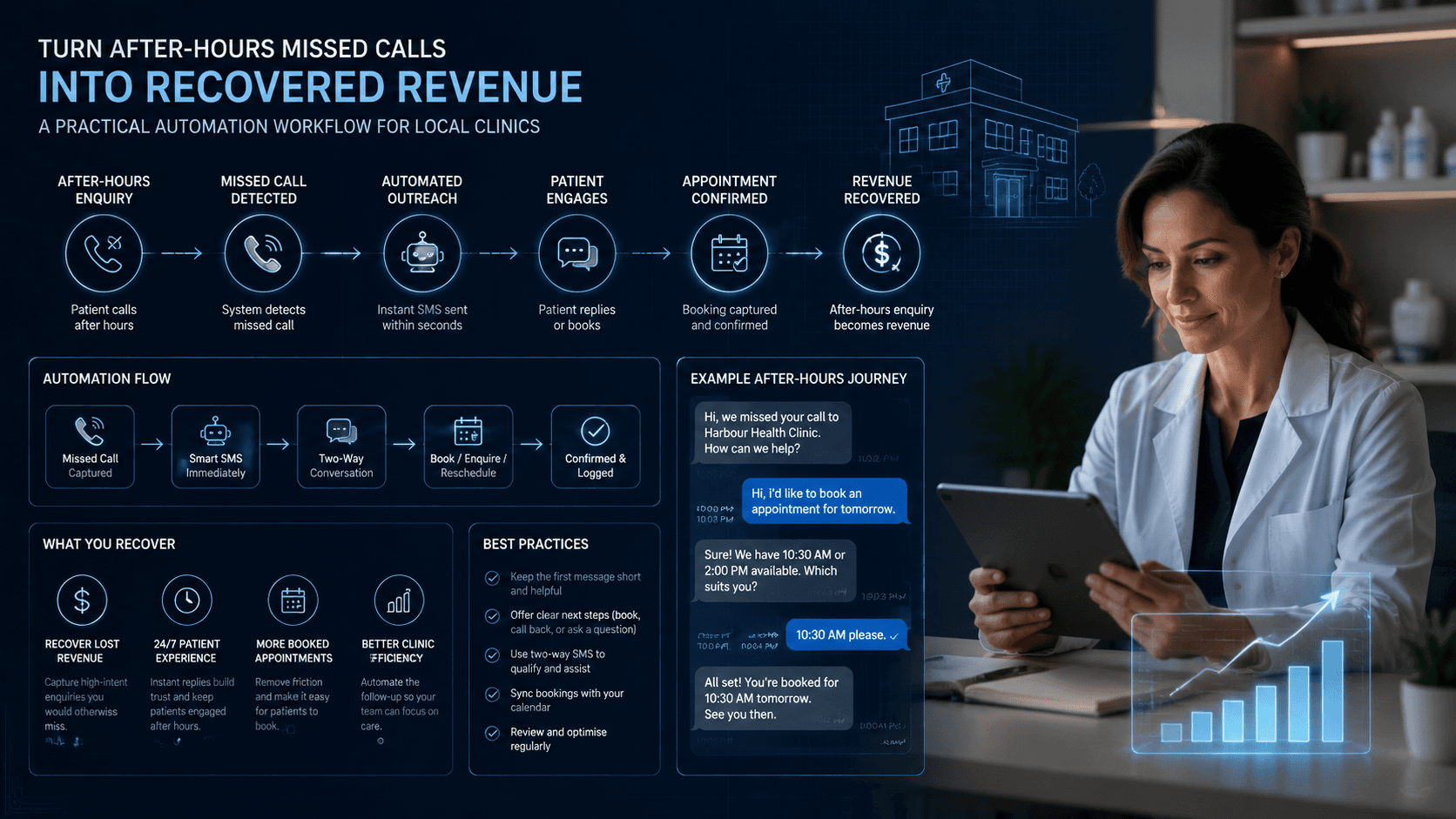
Local clinics routinely lose appointment opportunities and new‑patient enquiries simply because nobody was available to answer the phone. Missed-call recovery automation fixes that by capturing the patient’s intent within seconds, even after hours, and routing them into a booking workflow before they contact another provider. This guide shows clinic owners exactly how to implement the system, avoid common operational traps, and estimate the revenue they can recover. If you want a predictable way to convert after‑hours demand, the steps below are built for you.
Why Clinics Lose Revenue After Hours
The reality of after‑hours demand
Most clinics experience a predictable pattern: daytime calls cluster around opening hours, and a secondary spike happens after doors close. Parents call after school, working adults call after their shift, and urgent issues come up late evening. Without automation, these calls go straight to voicemail — and most callers will not wait for a callback.
What typically happens when calls go unanswered
When someone calls after hours and doesn’t reach a human, these outcomes are common:
- They hang up and call the next clinic on Google.
- They assume the clinic is unavailable and postpone care.
- They leave a voicemail, but by morning their intent has dropped or they've already booked elsewhere.
Even highly disciplined teams struggle with the next‑morning backlog. And if staff must triage messages manually, the clinic often responds too slowly to win the appointment.
How much revenue goes unclaimed (example model)
A simple, illustrative example:
- Example: A clinic receives 15 after‑hours calls per weekday.
- Example: If even 30% represent bookable appointments, that’s 4–5 missed opportunities nightly.
- Example: If an average appointment is worth $90–$150 in revenue, the clinic could be losing $360–$750 per night.
Actual numbers vary by specialty and region. You can plug in your real call volume using the MyJarvis missed‑call calculator for an accurate projection.
What Missed‑Call Recovery Automation Actually Does
Definition and workflow overview
Missed‑call recovery automation is a workflow that detects a missed call and immediately triggers an intelligent follow‑up — typically SMS or an AI voice employee — to convert the enquiry into a booking or triage event.
A standard workflow looks like this:
- Patient calls the clinic after hours.
- The call is marked as missed by the phone system.
- Within seconds, automation sends an SMS or AI voice callback.
- The patient receives a scheduling link, guidance, or a triage message.
- The booking is logged into your calendar or CRM.
AI voice employee vs SMS follow‑up
Both approaches work — the best choice depends on your patient expectations and clinic workflow.
SMS follow‑up:
- Fast to deploy.
- Works well for appointment requests or simple questions.
- Ideal when patients prefer quick, low‑friction communication.
AI voice employee (like MyJarvis’ AI Voice Employee):
- Can gather more context and answer common questions.
- Handles complex appointment types.
- Can deflect calls from staff without lowering service quality.
You can learn more about this option via the AI Voice Employee overview.
How it fits into existing clinic operations
Missed‑call recovery doesn't replace front-desk staff — it covers the gaps that humans cannot realistically manage 24/7. Clinics often combine:
- Live staff during business hours.
- AI voice employees for overflow or high call‑volume seasons.
- After‑hours automation for bookings and urgent triage.
Because the workflow integrates with common phone systems and calendars, it becomes a simple extension of your existing processes.
Implementation Playbook for Local Clinics
Step 1: Map your current after‑hours call flow
Start by writing down:
- When your phone system rolls to voicemail.
- Whether you use a shared phone, answering service, or IVR.
- How staff currently retrieve voicemails or missed-call logs.
This gives you a baseline to identify where automation should trigger.
Step 2: Identify missed‑call sources and timing
Look for:
- After‑hours call spikes.
- Weekends and holiday peaks.
- Trends related to seasonality (e.g., flu season, sports injuries).
Most clinics discover that over 30% of enquiries happen outside call‑answering windows — but check your own logs rather than relying on assumptions.
Step 3: Connect phone system to the automation layer
You’ll need:
- Your clinic’s phone provider login.
- Access to call logs or webhook events for missed calls.
- A simple forwarding rule that sends missed‑call events to MyJarvis.
Most VoIP systems (RingCentral, 8x8, Dialpad, etc.) support this. Traditional landlines can be routed via VoIP adapters or call‑forwarding.
Step 4: Set up SMS or AI voice responses
Decide whether your clinic should send:
- A booking link.
- A triage question.
- A quick “We saw your call — how can we help?” message.
Keep the first message short and helpful. Automation is most effective when the patient feels immediately acknowledged.
Step 5: Create booking or triage follow‑up sequences
Your sequence might include:
- SMS 1: “We saw your call. Are you looking to book an appointment?”
- SMS 2: “Here’s the link to schedule.”
- SMS 3: “If this is urgent, reply ‘urgent’ and we’ll route accordingly.”
MyJarvis can automate all replies, send reminders, and log interactions directly into your CRM.
Step 6: Configure fallback human handoff
Some enquiries require human intervention — especially complex or sensitive cases. Build an escalation path such as:
- If patient replies “urgent,” forward to on‑call staff.
- If automation fails to match an appointment type, tag human review.
- If the patient requests a callback, notify a team member.
This keeps service high without overwhelming staff.
Step 7: Test, refine, and monitor performance
Run test calls outside business hours. Validate:
- Timing of SMS/AI callbacks.
- Calendar availability accuracy.
- Correct routing for urgent cases.
- CRM logging and tagging.
Adjust messaging based on real patient responses during the first two weeks.
Build a Revenue Recovery Scenario
Use operational data the clinic can verify:
- Monthly missed calls.
- Share of missed calls that are appropriate and bookable.
- Response and qualification rates after follow-up.
- Booking and show rates among qualified patients.
- Average contribution from a completed appointment.
Potential recovered value is the product of those inputs. Use measured rates and a financially appropriate value—not a generic industry estimate—and compare the scenario with actual results after launch.
Validate the model with the MyJarvis calculator
Use your call volume and service values in the MyJarvis Missed-Call Revenue Calculator. It provides:
- Estimated monthly missed revenue.
- The financial impact of after‑hours recovery.
- A before/after comparison once automation is live.
The result is a planning estimate based on your inputs, not a guarantee of clinical volume or revenue.
Operational Checklist
Technical
- Confirm your phone system supports missed‑call webhooks or forwarding.
- Integrate calendar/EMR booking links.
- Test AI voice or SMS compatibility.
- Ensure your CRM syncs with appointment data.
Messaging
- Keep initial messages short.
- Use plain language and avoid jargon.
- Include a clear path to schedule or request help.
- Provide answers for your top 5 routine enquiries.
Compliance considerations
- Avoid collecting PHI via unapproved channels.
- Use HIPAA‑aligned workflows where required.
- Configure the AI so it doesn’t diagnose or offer medical advice.
- Ensure auditability of messages and logs.
Team alignment
- Train staff on the new escalation path.
- Let clinicians know what automation handles.
- Review call logs weekly during rollout.
- Document how urgent replies are routed.
Common Pitfalls and How to Avoid Them
Overcomplicated messaging
Long messages reduce conversion. Keep it simple and break information across multiple follow‑ups when needed.
Slow response times
Even a 2–5 minute delay lowers conversion. Aim for response times under 15 seconds.
Missing CRM integration
If bookings don’t sync into your system, staff may double‑book or miss patient notes. Confirm two‑way syncing before going live.
No escalation path
Without a clear human fallback, you risk frustration for urgent callers. Always define who receives escalations and when.
FAQ
Does missed‑call recovery automation work for clinics with irregular after‑hours schedules? Yes. You can configure automation to trigger only during specific hours, certain days, or conditional rules (holidays, seasonal load, etc.).
Is this compatible with my current phone and scheduling system? Most VoIP systems integrate immediately. Schedulers like Calendly‑style tools, EMR calendars, and many clinic CRMs can be connected with minimal setup.
How quickly can a clinic go live with MyJarvis automation? Most clinics go live within a few days once phone-system credentials and scheduling links are ready.
Can automation handle sensitive patient information? Yes, within boundaries. MyJarvis uses HIPAA‑aligned practices but will not diagnose symptoms or store PHI outside approved fields.
Next Steps: Book a MyJarvis Strategy Call
If you want a tailored assessment of your missed‑call volume, realistic revenue recovery projections, and a workflow built for your clinic, book a strategy call. A MyJarvis specialist will walk through your current setup and map the fastest path to implementation.
Book here: Schedule a consultation
Want this answering leads while your team is busy?
We can map your missed-call, booking, and follow-up workflow into a practical AI voice employee plan.
Get the automation checklist
A simple checklist for spotting the first workflow worth automating.